
We have all been there: you open your music app for a long commute, but you simply don’t have the patience to build a fresh mix from scratch. Fortunately, Google is rolling out a massive update to fix exactly that. The introduction of YouTube AI playlists is changing how we discover and curate music on the platform.
Instead of manually searching for individual tracks, you can now use simple text prompts to generate highly customized music mixes in seconds.
But how well does this feature actually work in the real world? Let’s break down everything you need to know about this new tool, how it compares to the competition, and exactly how you can access it today.
What Are YouTube AI Playlists?
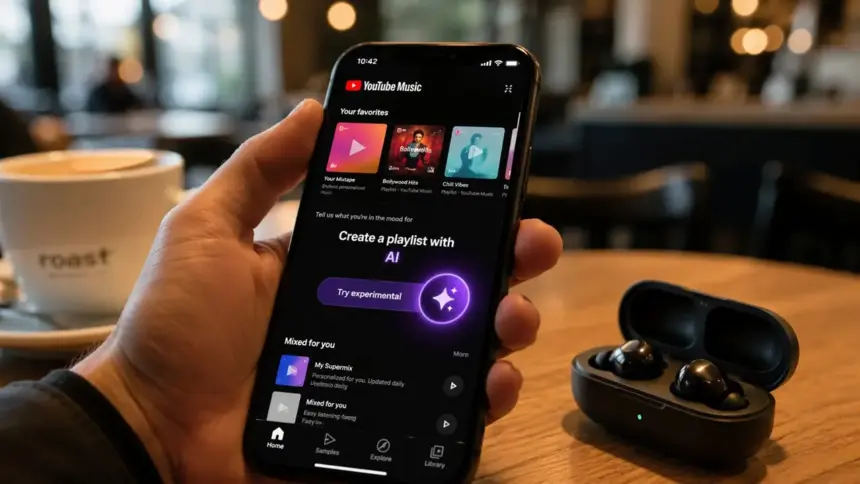
If you have ever used ChatGPT or Google Gemini, the concept here is identical. Instead of searching for a generic “workout mix,” the new YouTube AI playlists feature allows you to type conversational prompts to dictate the exact vibe you want.
You can ask the AI for something highly specific, such as “upbeat 90s Bollywood songs for a morning run” or “relaxing lo-fi beats to help me study for finals.”
The system analyzes your prompt, cross-references it with your listening history, and instantly generates a unique playlist. In our experience, the recommendations are surprisingly accurate, successfully blending popular hits with deep cuts you might have forgotten about.
How to Create YouTube AI Playlists in India
Google typically tests these features extensively before a wide release. Currently, this tool is rolling out gradually. Here are the steps to check if it is available on your device and how to use it:
- Update Your App: Head to the Google Play Store or Apple App Store and ensure you have the absolute latest version of YouTube Music.
- Look for the Sparkle Icon: Open the app and tap the “+” button located at the bottom to create a new playlist. If the feature is active on your account, you will see a new AI “sparkle” icon.
- Type Your Prompt: Enter your specific request. Don’t be afraid to get creative with genres, decades, or specific moods.
- Edit the Results: Once the AI generates the list, you can easily swipe to remove songs you don’t like.
- Save and Listen: Hit save, and your custom mix is instantly added to your library.
Note: Many users are noticing that Google is prioritizing YouTube Premium subscribers for this initial rollout. If you are on the free tier, you might have to wait a little longer.
YouTube AI vs. Spotify’s AI DJ
Spotify has offered its AI DJ feature for a while now, so how does this new update compare?
Spotify’s AI acts more like a traditional radio host. It talks to you, learns your habits, and feeds you a continuous stream of music based on what it guesses you want to hear.
YouTube’s approach is much more hands-on. By letting you write the prompt yourself, YouTube gives you direct control over the final output. If you want a highly specific, mood-based playlist for a 45-minute drive, the prompt-based generation is currently much faster and more practical than waiting for Spotify’s DJ to guess your mood correctly.
Should You Be Worried About Privacy?
Whenever a new artificial intelligence feature launches, privacy is a valid concern. To generate accurate recommendations, the AI does analyze your past listening data.
However, according to Google’s standard privacy policies, this data remains within your account ecosystem to improve your personal recommendations. If you prefer to keep your listening habits completely private, you can pause your watch and search history in your account settings—though doing so will make your generated playlists far less personalized.
The Bottom Line
While some generative AI features feel like unnecessary gimmicks, using AI to cure “playlist fatigue” is genuinely useful. It saves time and helps you discover music that perfectly fits your exact mood. If you have the feature active on your app, it is absolutely worth testing out on your next commute.
FAQs
How do I get the AI playlist feature on YouTube? Ensure your YouTube Music app is updated to the latest version. Tap the button to create a new playlist, and look for the AI prompt option. Keep in mind it is rolling out gradually, often prioritizing Premium users first.
Are YouTube AI playlists available in India? Yes, Google is rolling this feature out globally, including in India. However, it is a phased rollout, meaning it might take a few weeks to appear on every single device.
Can I edit the AI-generated playlist before saving it? Absolutely. Before you save the final mix to your library, you can easily swipe to remove specific songs or refresh your text prompt to get a completely different selection of tracks.
Follow TechVerma
Stay updated with the latest tech news, AI tools, smartphone launches, gadget reviews, and technology trends by following TechVerma on social media:
Visit:
TechVerma Official Website
For entertainment news, OTT updates, celebrity coverage, and movie trends, visit: