
By using this site, you agree to the Privacy Policy and Terms of Use.
Accept
TechVerma | Latest Tech News, AI Tools & Gadget UpdatesTechVerma | Latest Tech News, AI Tools & Gadget UpdatesTechVerma | Latest Tech News, AI Tools & Gadget Updates
  • Tech News
  • Smartphones
    • Samsung
    • iPhone
    • OnePlus
    • Realme
    • Xiaomi
  • AI Tools
    • ChatGPT
    • AI Image Tools
    • AI Video Tools
    • Productivity AI
  • Laptops
    • Gaming Laptops
    • Budget Laptops
    • Student Laptops
  • How To
    • Tutorials + fixes
  • Apps & Software
    • Android Apps
    • Windows Software
    • Mac Apps
  • Gadget
    • Smartwatch
    • Earbuds
    • Tablets
    • Accessories
Search
© 2026 TechVerma. All Rights Reserved.
Reading: WhatsApp Voice Message Transcripts: Convert Audio to Text Easily
Share
Notification
Font ResizerAa
TechVerma | Latest Tech News, AI Tools & Gadget UpdatesTechVerma | Latest Tech News, AI Tools & Gadget Updates
Font ResizerAa
  • Tech News
  • Gadget
  • Technology
  • Smartphones
Search
  • Tech News
  • Smartphones
    • Samsung
    • iPhone
    • OnePlus
    • Realme
    • Xiaomi
  • AI Tools
    • ChatGPT
    • AI Image Tools
    • AI Video Tools
    • Productivity AI
  • Laptops
    • Gaming Laptops
    • Budget Laptops
    • Student Laptops
  • How To
    • Tutorials + fixes
  • Apps & Software
    • Android Apps
    • Windows Software
    • Mac Apps
  • Gadget
    • Smartwatch
    • Earbuds
    • Tablets
    • Accessories
Have an existing account? Sign In
© 2026 Tech Verma. All Rights Reserved.
TechVerma | Latest Tech News, AI Tools & Gadget Updates > Blog > Tech News > WhatsApp Voice Message Transcripts: Convert Audio to Text Easily
Tech News

WhatsApp Voice Message Transcripts: Convert Audio to Text Easily

Chandan Verma
Last updated: June 5, 2026 3:10 pm
Chandan Verma
Share
Whatsapp Voice Message Transcripts
WhatsApp voice message transcripts
SHARE

We have all been in that awkward situation: you are in a noisy crowded place, or sitting in a quiet meeting, and someone sends you a long voice note. You cannot play it aloud, and you do not have earphones handy. Thankfully, that struggle is officially over. With the latest update rolling out in June 2026, knowing how to use WhatsApp voice message transcripts is going to change the way you chat forever.

Contents
What Are WhatsApp Voice Message Transcripts?Step-by-Step: How to Enable and Use the FeatureWhy Is This Feature Not Showing Up For Me?The Bottom LineFAQsAre WhatsApp voice message transcripts accurate in Hindi?Do transcriptions break end-to-end encryption?Does this feature work for old voice messages?

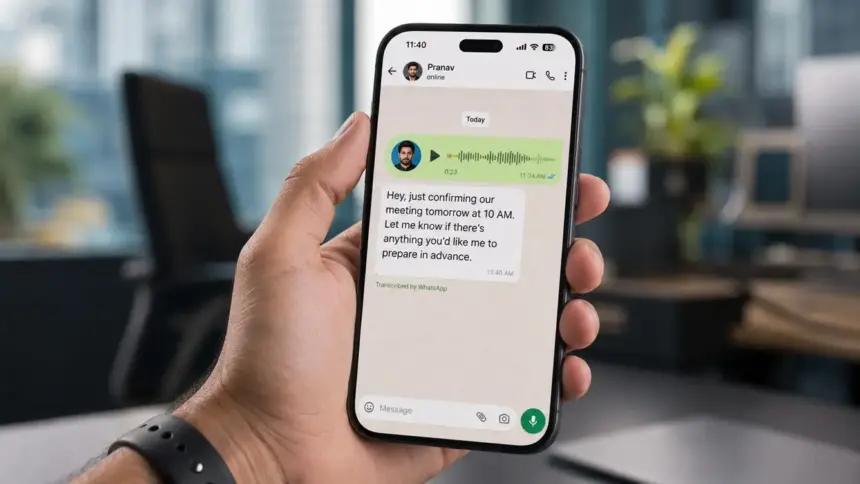
WhatsApp has finally introduced a native feature that converts any voice note into readable text instantly, right inside the chat window. No more downloading sketchy third-party apps or holding the phone to your ear in a loud room. Here is everything you need to know about setting up and using this brilliant new feature on your Android device.

What Are WhatsApp Voice Message Transcripts?

Simply put, WhatsApp voice message transcripts are auto-generated text captions for your audio messages. Using advanced on-device AI speech-recognition technology, WhatsApp listens to the voice note and types out exactly what the person is saying.

The best part about this feature is that the transcription happens locally on your smartphone. The audio data is not sent to Meta’s cloud servers, ensuring that your private conversations remain protected by WhatsApp’s end-to-end encryption.

If you are also interested in boosting your online privacy, make sure to check out our recent guide on how to log out of WhatsApp natively without deleting chats.

Step-by-Step: How to Enable and Use the Feature

If you have recently updated your app via the Google Play Store, here is how you can activate and start using WhatsApp voice message transcripts:

  • Step 1: Open WhatsApp and tap on the three-dot menu icon in the top right corner.
  • Step 2: Navigate to Settings and tap on the Chats section.
  • Step 3: Scroll down until you find the option labeled Voice Message Transcripts and toggle it ON.
  • Step 4: You will be prompted to select your preferred language (e.g., English, Hindi, Spanish). WhatsApp will download a small language pack (around 150MB) to process speech offline.
  • Step 5: Open any chat with a voice note. You will now see the transcribed text magically appear right underneath the audio player bubble!

For more official details on how WhatsApp manages privacy during transcriptions, you can always check the official WhatsApp Help Center.

Why Is This Feature Not Showing Up For Me?

If you followed the steps above but cannot find the WhatsApp voice message transcripts setting, don’t panic. Meta usually rolls out massive updates in phases. Ensure that your Android operating system is updated, and check the Google Play Store daily for the latest WhatsApp version. The feature is expected to reach all global users within the next few weeks.

The Bottom Line

Voice notes are incredibly convenient for the sender but often annoying for the receiver. The introduction of WhatsApp voice message transcripts completely bridges this gap, making communication seamless regardless of your environment. Whether you are at a loud concert or a silent library, you will never have to guess what a voice note says again.

FAQs

Are WhatsApp voice message transcripts accurate in Hindi?

Yes. The new transcription feature supports multiple regional languages, including Hindi and ‘Hinglish’. The on-device AI is highly trained to recognize local accents, making the WhatsApp voice message transcripts surprisingly accurate for Indian users.

Do transcriptions break end-to-end encryption?

No, your privacy is completely safe. The transcription process occurs entirely locally on your device’s hardware, meaning Meta cannot listen to your voice notes or read the transcribed text.

Does this feature work for old voice messages?

Yes! Once you enable the feature and download the language pack, you can scroll up to old chats, tap on any previously received voice note, and the app will generate a transcript for it within seconds.


 

You Might Also Like

Qualcomm AI Device Push Signals Major Shift Beyond phones
Motorola Edge 70 Pro+ vs Xiaomi 17T: The Big June 4 Battle!
PM Modi Invites Dutch Companies to ‘Design, Innovate and Manufacture in India’
Best Smartphones Under ₹25,000 in India 2026 — Our Honest Top Picks
How to Log Out of WhatsApp Without Deleting Chats (New Update)
TAGGED:AI ToolsAndroid AppsHow ToTech NewsWhatsApp
Share This Article
Facebook Pinterest Whatsapp Whatsapp LinkedIn Tumblr Reddit Copy Link Print
Share
Avatar Of Chandan Verma
ByChandan Verma
Follow:
Chandan Verma is a Senior WordPress Developer and SEO Expert with over 8 years of experience in digital media, website development, and search engine optimization. He has successfully managed 80+ SEO projects and built 150+ WordPress websites across various industries. Chandan is the founder of TechVerma, a technology media platform covering the latest tech news, AI tools, smartphones, gadgets, and digital trends. He is passionate about making technology simple and accessible for every Indian reader. With expertise in On-page SEO, Off-page SEO, Technical SEO, and WordPress development, Chandan brings deep hands-on knowledge to every article he writes on TechVerma.
Previous Article Lava Blaze N2 5G Launch Lava Blaze N2 5G Launch in India: Best Budget Phone Under ₹10,000?
Next Article Shopify Is Down Today Shopify Down Today: Checkouts and Admin Panel Crash Globally
Leave a Comment

Leave a Reply Cancel reply

Your email address will not be published. Required fields are marked *

Stay Connected

10Like
848Follow
3Pin
131Follow

Latest News

Apple Wwdc 2026
Apple WWDC 2026: iOS 27 Leaks and Massive Siri AI Overhaul
Tech News iPhone
Shopify Is Down Today
Shopify Down Today: Checkouts and Admin Panel Crash Globally
Tech News
Lava Blaze N2 5G Launch
Lava Blaze N2 5G Launch in India: Best Budget Phone Under ₹10,000?
Smartphones
Wi-Fi Privacy Risks
Hidden Wi-Fi Privacy Risks: How Your Router Can Spy On You
Tech News Technology

You Might also Like

Ios 26.5 Features For 6 Cool New Iphone Features
Tech NewsiPhone

iOS 26.5 Features Is Now Available With 6 Cool New Features for iPhone Users

Chandan Verma
Chandan Verma
5 Min Read
Iphone 18 Series Leaks
SmartphonesiPhone

iPhone 18 Series Leaks: Massive Battery & New Camera Details

Chandan Verma
Chandan Verma
4 Min Read
Chatgpt Vs Gemini Vs Claude 2026
AI Tools

ChatGPT vs Gemini vs Claude 2026 — Which is the Best AI Tool in 2026?

Chandan Verma
Chandan Verma
8 Min Read
//

TechVerma is a modern tech media platform covering AI tools, smartphones, gadgets, software, and the latest technology trends.

Quick Link

  • About Us
  • Contact Us
  • Editorial Policy
  • AI Policy
  • Review Methodology
  • Terms and Conditions

Categories

  • Tech News
  • Smartphones
  • AI Tools
  • Comparisons
  • Reviews
  • How To

Subscribe for Daily Tech Updates

Get the latest tech news, AI updates, smartphone launches, and gadget reviews directly in your inbox.

    TechVerma | Latest Tech News, AI Tools & Gadget UpdatesTechVerma | Latest Tech News, AI Tools & Gadget Updates
    Follow US
    © 2026 TechVerma. All Rights Reserved.
    Welcome Back!

    Sign in to your account

    Username or Email Address
    Password

    Lost your password?